Let’s start by an example:
If your blog is at http://example.com/blog/ and a visitor clicks on a link to a category page such as http://example.com/blog/category/your-cat/, WordPress looks for a template file in the current theme’s directory that matches the category’s ID to generate the correct page. More specifically, WordPress follows this procedure:
- Looks for a template file in the current theme’s directory that matches the category’s slug. If the category slug is “unicorns,” then WordPress looks for a template file named
category-unicorns.php. - If
category-unicorns.phpis missing and the category’s ID is 4, WordPress looks for a template file namedcategory-4.php. - If
category-4.phpis missing, WordPress will look for a generic category template file,category.php. - If
category.phpdoes not exist, WordPress will look for a generic archive template,archive.php. - If
archive.phpis also missing, WordPress will fall back to the main theme template file,index.php.
Visual Overview
The following diagram shows which template files are called to generate a WordPress page based on the WordPress template hierarchy.
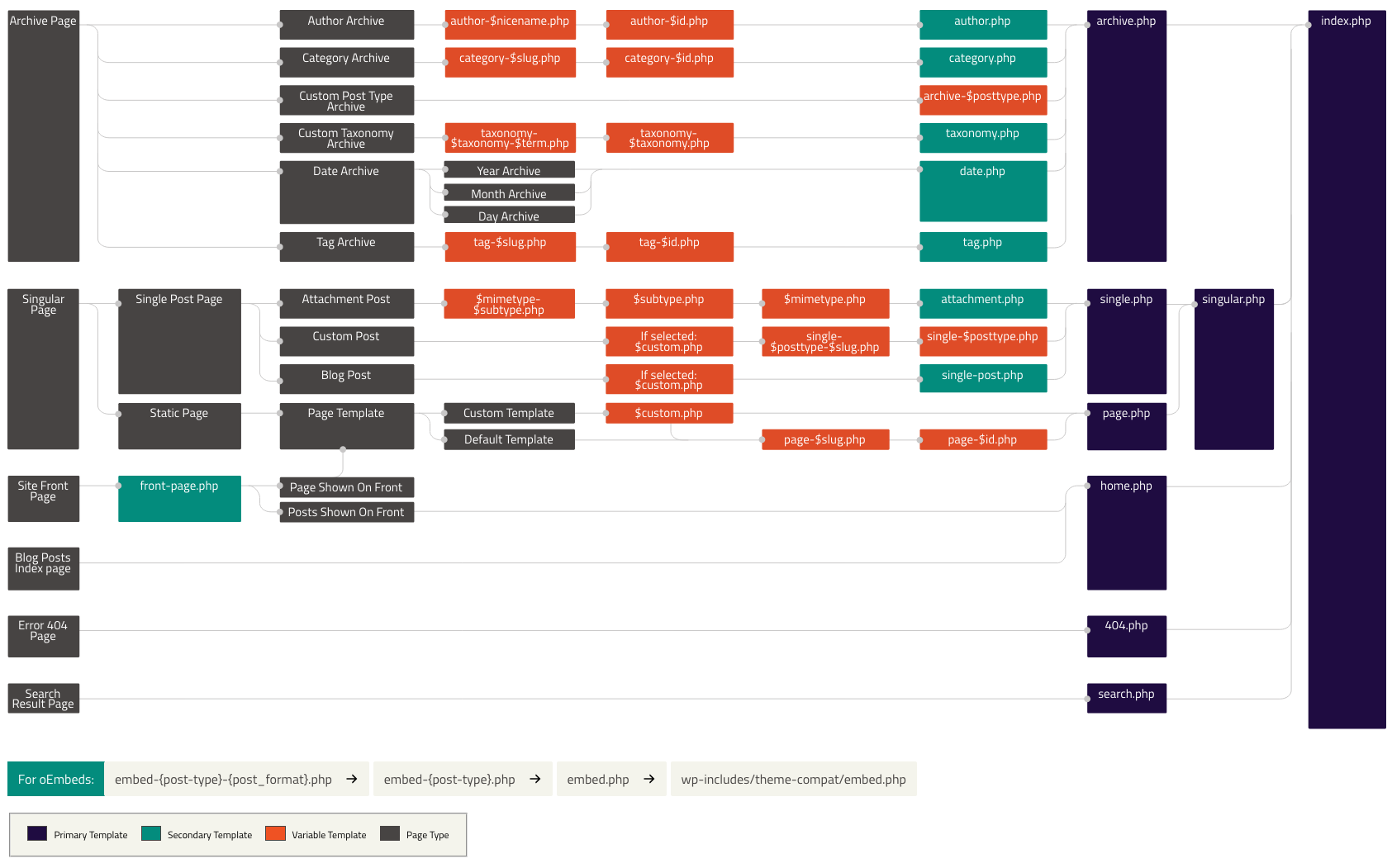
Reference:
https://developer.wordpress.org/themes/basics/template-hierarchy/