Place this code inside your functions.php or your plugin file.
Remember that if you are planning to use it on the functions.php this functionality might stop working, if for example you update or change the theme associated with the functions.php.
So, having said that, let’s say you want to add a new Products custom post type. Open your file and paste this code:
function wporg_custom_post_type() {
    register_post_type('wporg_product',
        array(
            'labels'      => array(
                'name'          => __( 'Products', 'textdomain' ),
                'singular_name' => __( 'Product', 'textdomain' ),
            ),
            'public'      => true,
            'has_archive' => true,
            'rewrite'     => array( 'slug' => 'products' ), // my custom slug
        )
    );
}
add_action('init', 'wporg_custom_post_type');
With this example, your custom post type would be Products, the singular name would be Product, and the slug would be products.
If you don’t want to use code, you could just install a plugin that would plug this code for you.
Will show how, with the Custom Post Type UI plugin:
https://wordpress.org/plugins/custom-post-type-ui/
After installing and activating it, click the Add/Edit Post Types inside the CPT UI menu.
Insert the slug name, plural label and singular label like the image below:
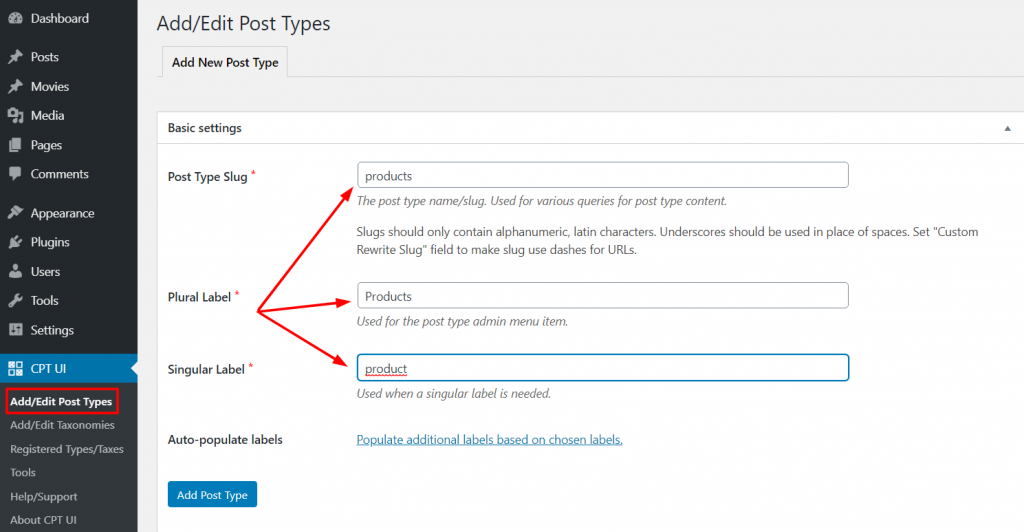
Click Add Post Type and that’s it.
How to list custom post types on the home page?
Add this code on the functions.php or your plugin file:
function add_my_post_types_to_query($query) {
    if (is_home() && $query->is_main_query()) {
        $query->set('post_type', array('post', 'products'));
    }
    return $query;
}

add_action('pre_get_posts', 'add_my_post_types_to_query');
How to query custom post type a show results on view file?
Add this code on the view file you are using. It could be, for example, a archive-products.php or single-movies.php:
<?php
	$args = array('post_type' => 'products', 'posts_per_page' => 10);
	$the_query = new WP_Query( $args );
?>
<?php if ( $the_query->have_posts() ) : ?>
<?php while ( $the_query->have_posts() ) : $the_query->the_post(); ?>
<h2>Major: <?php the_title(); ?></h2>
<div class="entry-content">
<?php the_content(); ?>
</div>
<?php endwhile; ?>
<?php wp_reset_postdata(); ?>
<?php else: ?>
<p><?php _e( 'Sorry, no posts matched your criteria.' ); ?></p>
<?php endif; ?>
Reference:
https://developer.wordpress.org/plugins/post-types/registering-custom-post-types/
https://www.wpbeginner.com/wp-tutorials/how-to-create-custom-post-types-in-wordpress/