How to restrict access to some files on server?

This .htaccess code should return 403 error on several sensivel files that usually stay forgotten on the server.

# SECURE LOOSE FILES 
<IfModule mod_alias.c>
	RedirectMatch 403 (?i)(^#.*#|~)$
	RedirectMatch 403 (?i)/readme\.(html|txt)
	RedirectMatch 403 (?i)\.(ds_store|well-known)
	RedirectMatch 403 (?i)/wp-config-sample\.php
	RedirectMatch 403 (?i)\.(7z|bak|bz2|com|conf|dist|fla|git|inc|ini|log|old|psd|rar|tar|tgz|save|sh|sql|svn|swo|swp)$
</IfModule>

Credits:
https://www.linkedin.com/learning/wordpress-developing-secure-sites/remove-unused-plugins-and-themes

[JS] Closures

Closures is a function inside a function that relies on variables in the outside function to work.

Or more elaborated:

closure is the combination of a function bundled together (enclosed) with references to its surrounding state (the lexical environment). In other words, a closure gives you access to an outer function’s scope from an inner function. In JavaScript, closures are created every time a function is created, at function creation time.

https://developer.mozilla.org/en-US/docs/Web/JavaScript/Closures
function giveMeEms(pixels) {
	var baseValue = 16;
	
	function doTheMath() {
		return pixels/baseValue;
	}

	return doTheMath;

}

var smallSize = giveMeEms(12);
var mediumSize = giveMeEms(18);
var largeSize = giveMeEms(24);
var xlargeSize = giveMeEms(32);

console.log("Samll size: " + smallSize());
console.log("Medium size: " + mediumSize());
console.log("Large size: " + largeSize());
console.log("Extra Large size: " + xlargeSize());

Reference:
https://www.linkedin.com/learning/javascript-essential-training-3
https://developer.mozilla.org/en-US/docs/Web/JavaScript/Closures

[JS] How to make an object in JS

Here is one possible way of creating an object:

var course = new Object();
course.title = "Javascript Essential Training";
course.instructor = "Morten Rand-Hendriksen";
course.level = 1;
course.published = true;
course.views = 0;

We could also use this alternative syntax and accomplish the same result:

var course = {
  title: "Javascript Essential Training",
  intrtructor: "Morten Rand-Hendriksen",
  level: 1,
  published: true,
  views: 0
}

Additionally we can add methods to this object:

var course = {
  title: "Javascript Essential Training",
  intrtructor: "Morten Rand-Hendriksen",
  level: 1,
  published: true,
  views: 0,
  updateViews: function() {
    return ++course.views;
  }
}

Now, since all the variables are hardcoded inside the object let’s see how we can turn this a bit more abstract:

function Course(title, instructor, level, published, views) {
  this.title = title;
  this.instructor = instructor;
  this.level = level;
  this.published = published;
  this.views = views;
	this.updateViews = function() {
	  return ++this.views
  }
}

var course01 = new Course("Javascript Essential Training", "Morten Rand-Hendriksen", 1, true, 0);
var course02 = new Course("Up and Running With ECMAScript 6", "Eve Porcello", 1, true, 0);

Reference:
JavaScript Essential Training
https://www.linkedin.com/learning/javascript-essential-training-3

[JS] global vs const vs var vs let

Here’s an example of how to use each one of the above keywords.

function getProgramName() {
    programName = "ABC";
}

getProgramName();
console.log("Program name: " + programName);

As the programName variable is not prefixed with var, let or const it is a global variable with a global scope. Meaning that it is visible anywhere in the script regardless it is being accessed inside any function.

On the other hand, the const keyword has a local scope and is used to define variables that won’t be modified EVER.

function getPI() {
    const PI = 3.14;
    return PI;
}

getPI();
console.log("PI: " + PI);

So, if you try to assign another value to the const variable an error will be thrown.

function getPI() {
    const PI = 3.14;

    if (true) {
      PI = 3.15;
    }

    return PI;
}

getPI();
console.log("PI: " + getPI());

>> error: Uncaught TypeError: Assignment to constant variable.

Regarding the var statement, the scope of a variable declared with var is its current execution context and closures thereof, which is either the enclosing function and functions declared within it, or, for variables declared outside any function, global. Duplicate variable declarations using var will not trigger an error, even in strict mode, and the variable will not lose its value, unless another assignment is performed.

function foo() 
  var x = 1;  
  function bar() {
    var y = 2;
    console.log(x); // 1 (function `bar` closes over `x`)
    console.log(y); // 2 (`y` is in scope)
  }
  bar();
  console.log(x); // 1 (`x` is in scope)
  console.log(y); // ReferenceError in strict mode, `y` is scoped to `bar`
}

foo();

Finally, the let statement declares a block-scoped local variable, optionally initializing it to a value.

let x = 1;

if (x === 1) {
  let x = 2;

  console.log(x);
  // expected output: 2
}

console.log(x);
// expected output: 1

Reference:
https://developer.mozilla.org/en-US/docs/Web/JavaScript/Reference/Statements/var
https://developer.mozilla.org/en-US/docs/Web/JavaScript/Reference/Statements/let

[wordpress] How to make an AJAX request?

Going to show 2 ways of performing AJAX requests in wordpress.
I’ll be using jQuery for the sake of simplicity.

Using hooks

Let’s start off by adding jQuery and a custom javascript file to our page:

function my_enqueue($hook) {
    wp_enqueue_script(
        'my_jquery', 
        'https://code.jquery.com/jquery-3.5.0.min.js',
        array(), 
        false, 
        true
    );

    wp_enqueue_script(
        'my_script', 
        get_stylesheet_directory_uri() . '/assets/js/scripts.js',
        array(), 
        false, 
        true
    );
}
add_action('wp_enqueue_scripts', 'my_enqueue', 999999); 

Now, the AJAX request will have to be done to the admin ajax url.
Here is one possible way of doing it:

function my_ajaxurl() {
   echo '<script type="text/javascript">
           var ajaxurl = "' . admin_url('admin-ajax.php') . '";
        </script>';
}
add_action('wp_head', 'my_ajaxurl');

The code below should be added on the scripts.js file:

jQuery.ajax({
	method: "POST",
	url: ajaxurl,
	data: {name: "John Doe", location: "Planet Earth", action: "ajaxTest"}
}).done(function(msg) {
	console.log(msg);
});

Where name and location are the parameters we want to send to the function that is going to handle the request and the action is where the name of the function is defined.

Now the function:

function ajaxTest() {
    echo $_POST['name'];
    echo '<br>';
    echo $_POST['location'];
    echo '<br>';
    wp_die();
}

Finally, we need to specify to actions in order to bind the AJAX request to the above function:

add_action('wp_ajax_ajaxTest', 'ajaxTest');
add_action('wp_ajax_nopriv_ajaxTest', 'ajaxTest');

wp_ajax_[action_name] fires authenticated Ajax actions for logged-in users.
The [action_name] will have to match the string defined on action param on the AJAX request – ajaxTest.
The second param of the do_action will have to match the function name – also ajaxTest.

wp_ajax_nopriv_[action_name] fires non-authenticated Ajax actions for logged-out users.
The [action_name] will have to match the string defined on action param on the AJAX request – ajaxTest.
The second param of the do_action will have to match the function name – also ajaxTest.

Here is the full code for the functions.php file:

function my_enqueue($hook) {
    wp_enqueue_script(
        'my_jquery', 
        'https://code.jquery.com/jquery-3.5.0.min.js',
        array(), 
        false, 
        true
    );

    wp_enqueue_script(
        'my_script', 
        get_stylesheet_directory_uri() . '/assets/js/scripts.js',
        array(), 
        false, 
        true
    );
}
add_action('wp_enqueue_scripts', 'my_enqueue', 999999); 

function my_ajaxurl() {
   echo '<script type="text/javascript">
           var ajaxurl = "' . admin_url('admin-ajax.php') . '";
        </script>';
}
add_action('wp_head', 'my_ajaxurl');

function ajaxTest() {
    echo $_POST['name'];
    echo '<br>';
    echo $_POST['location'];
    echo '<br>';
    wp_die();
}
add_action('wp_ajax_ajaxTest', 'ajaxTest');
add_action('wp_ajax_nopriv_ajaxTest', 'ajaxTest');

Using REST API

This is a more straightforward way.

Also enqueue the same scripts:

function my_enqueue($hook) {
    wp_enqueue_script(
        'my_jquery', 
        'https://code.jquery.com/jquery-3.5.0.min.js',
        array(), 
        false, 
        true
    );

    wp_enqueue_script(
        'my_script', 
        get_stylesheet_directory_uri() . '/assets/js/scripts.js',
        array(), 
        false, 
        true
    );
}
 add_action('wp_enqueue_scripts', 'my_enqueue', 999999); 

And define a javascript variable with site url:

function my_ajaxurl() {
   echo '<script type="text/javascript">
           var site_url = "' . site_url() . '";
        </script>';
}
add_action('wp_head', 'my_ajaxurl');

Now define your endpoint along with the handler function:

add_action('rest_api_init', function () {
    register_rest_route('stuff/v1', '/test/', array(
        'methods' => 'POST',
        'callback' => 'test_endpoint'
    ));
});
function test_endpoint($request) {
    $stuff = $request['stuff'];
    return "Received " . esc_html($stuff);
}

Now, on the scripts.js file:

$.ajax( {
    url: site_url + '/wp-json/stuff/v1/test',
    method: 'POST',
    data:{
        'stuff' : 'Hello World!'
    }
}).done( function (response) {
    console.log(response);
});

And that’s it.

Reference:
https://developer.wordpress.org/reference/hooks/wp_ajax__requestaction/
https://developer.wordpress.org/reference/hooks/wp_ajax_nopriv__requestaction/
https://wordpress.stackexchange.com/a/339855/186121
https://wordpress.stackexchange.com/a/193818/186121
[wordpress] Template Hierarchy

Let’s start by an example:

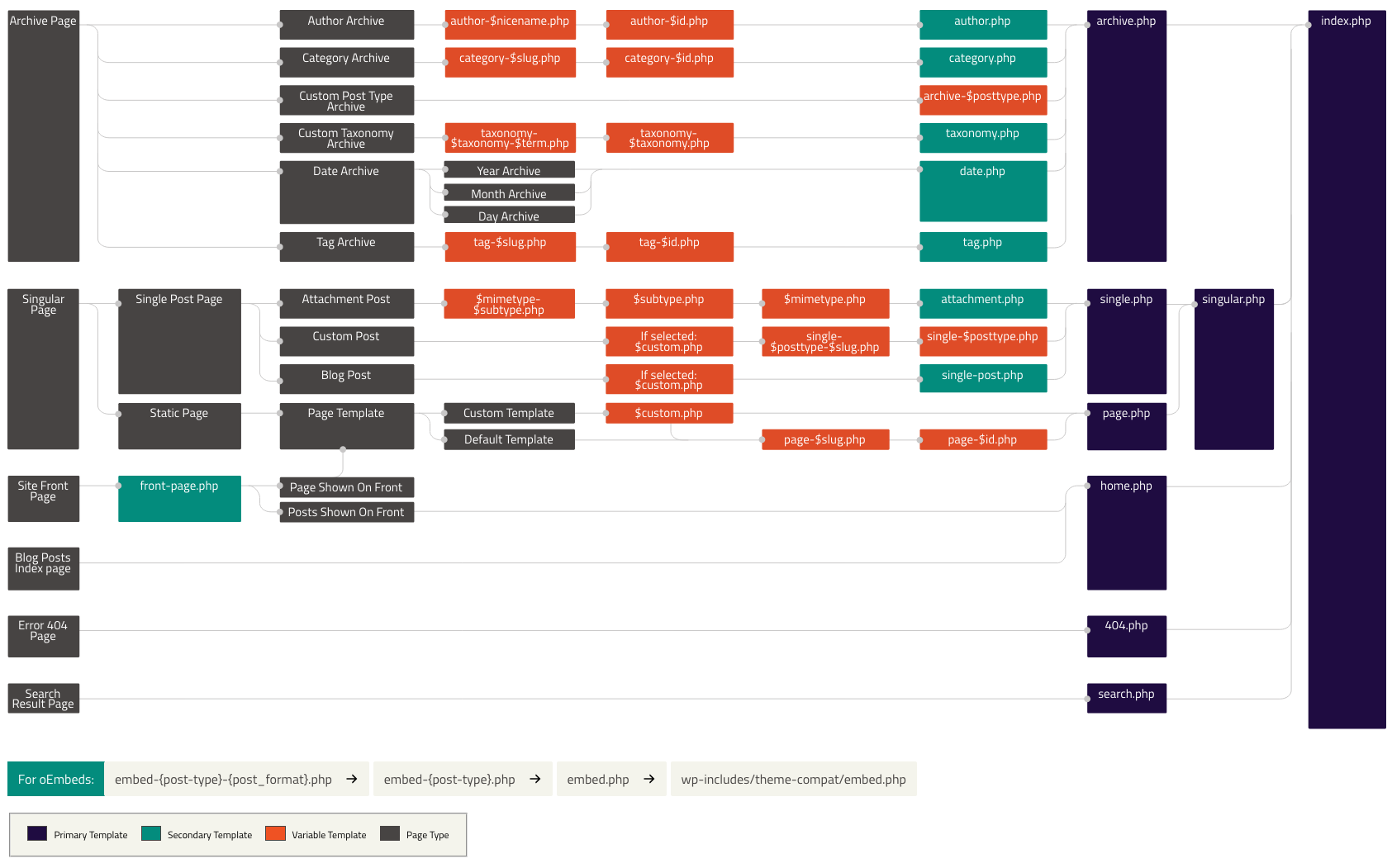
If your blog is at http://example.com/blog/ and a visitor clicks on a link to a category page such as http://example.com/blog/category/your-cat/, WordPress looks for a template file in the current theme’s directory that matches the category’s ID to generate the correct page. More specifically, WordPress follows this procedure:

  1. Looks for a template file in the current theme’s directory that matches the category’s slug. If the category slug is “unicorns,” then WordPress looks for a template file named category-unicorns.php.
  2. If category-unicorns.php is missing and the category’s ID is 4, WordPress looks for a template file named category-4.php.
  3. If category-4.php is missing, WordPress will look for a generic category template file, category.php.
  4. If category.php does not exist, WordPress will look for a generic archive template, archive.php.
  5. If archive.php is also missing, WordPress will fall back to the main theme template file, index.php.

Visual Overview

The following diagram shows which template files are called to generate a WordPress page based on the WordPress template hierarchy.

https://wphierarchy.com/

Reference:
https://developer.wordpress.org/themes/basics/template-hierarchy/

[wordpress] Theme Files Organization

This isn’t a strict rule but wordpress will look for these structure/files by default:

assets (dir)
      - css (dir)
      - images (dir)
      - js (dir)
inc (dir)
template-parts (dir)
      - footer (dir)
      - header (dir)
      - navigation (dir)
      - page (dir)
      - post (dir)
404.php
archive.php
comments.php
footer.php
front-page.php
functions.php
header.php
index.php
page.php
README.txt
rtl.css
screenshot.png
search.php
searchform.php
sidebar.php
single.php
style.css

Reference:
https://developer.wordpress.org/themes/basics/organizing-theme-files

[wordpress] How to get child theme / main theme path and URI?

Since WordPress 4.7, these functions are available:

get_theme_file_uri() – if using a child theme, it will return the child theme’s full URI. Otherwise, it will return the main theme full URI.
e.g.

echo get_theme_file_uri();
// www.site.com/wp-content/themes/twentytwenty-child

It’s also possible to send a subfolder/file as parameter, like so:

echo get_theme_file_uri('images/logo.png');
// www.site.com/wp-content/themes/twentytwenty-child/images/logo.png

get_theme_file_path() – same as get_theme_file_uri() but will return the full path of the child theme or main theme.

echo get_theme_file_path();
// C:\wordpress/wp-content/themes/twentytwenty-child

For child theme usage, there are the following functions:
get_parent_theme_file_uri()
get_parent_theme_file_path()

Reference:
https://developer.wordpress.org/themes/basics/linking-theme-files-directories/#linking-to-theme-directories